Brow · a free, open-source app for macOS
Claude Code rate limits in the MacBook notch
Brow shows the usage and rate limits of every Claude Code account you have, right in the notch: the 5-hour limit, the weekly limit, and when each resets.
or with Homebrew: brew install --cask efim0v/tap/brow
macOS 26 or later · Apple silicon · install notes

At a glance
Which account has room, and when the others free up
One account is enough: Brow picks up ~/.claude by itself. With several, it shows at a glance which account is close to its limit, which has room, and when each one frees up.
When each limit resets
The calendar marks every account’s weekly resets and estimated subscription renewals. Point at a day to see what frees up.

Sign in again in one click
When an account’s sign-in expires, one click next to it starts claude auth login for that account and opens the browser profile that belongs to it, already signed in to that account. Other accounts stay signed in.

Two numbers beside the notch
Collapsed, Brow shows how much of the 5-hour limit and of the weekly limit is used across your accounts. Hover and the panel opens.
The readouts can also sit in a strip below the notch. On a display without a notch, Brow shows a pill instead.

Every account in Settings
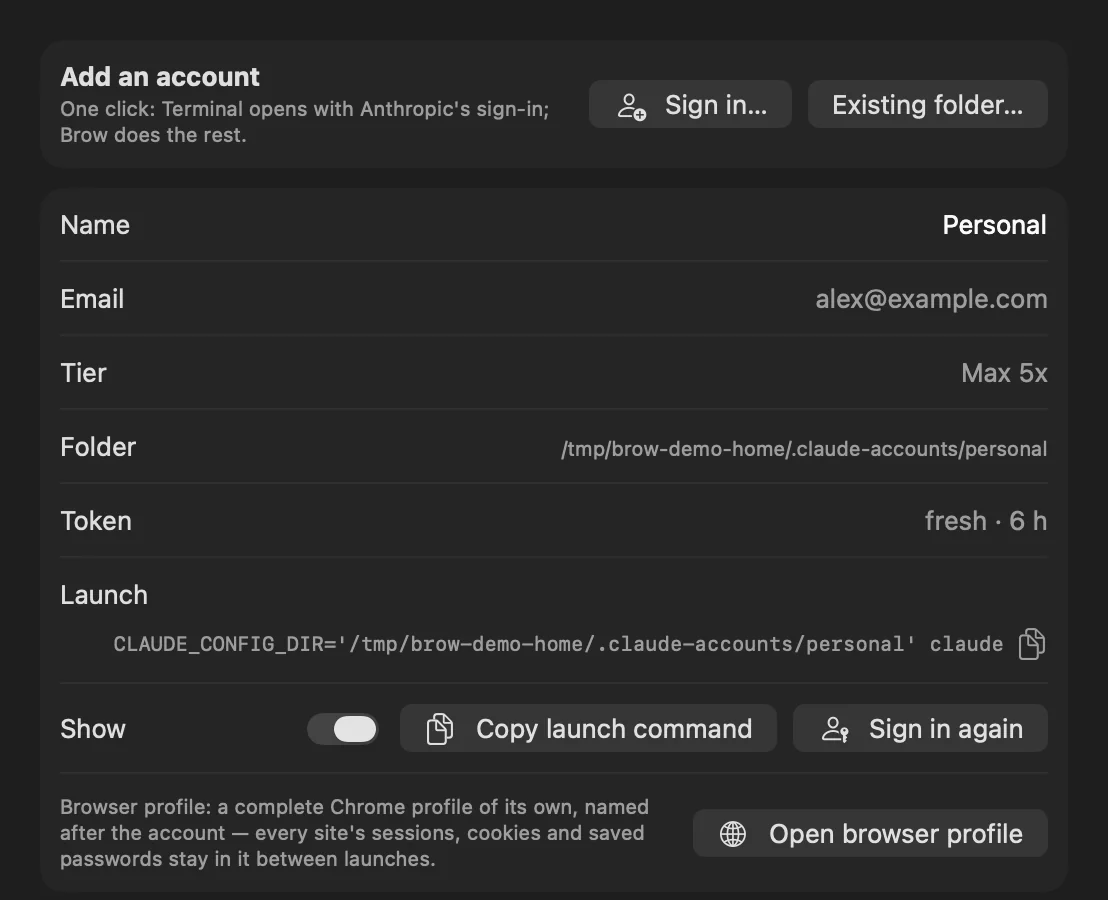
Settings → Accounts lists each account with its email, tier, folder, token state and launch command. Sign in… adds another account: Brow creates the folder and opens Anthropic’s own sign-in in Terminal.
Features
What it does
-
Every account at a glance
For each account: the 5-hour limit, the weekly limit and any model-specific weekly limit, as percent used, with the time until each resets.
-
A reset calendar
Weekly resets and estimated subscription renewals on a month grid, so you can see which account frees up when.
-
Copy the launch command
One button copies the command that starts Claude Code as that account.
-
Sign in again, in that account’s own browser
Each account gets a separate browser profile, with its own cookies, history and saved logins, so signing in to one never disturbs another. A second button opens that profile directly.
-
Add an account in one click
Brow creates the account folder and opens Anthropic’s own sign-in flow.
-
Tokens kept fresh
Idle accounts are refreshed in the background, so the numbers do not go stale.
Separate browser profiles need Google Chrome, Chromium, Brave or Edge. Without one of them, links open in your default browser, with no isolation. More on pacing, refresh and layout options is in Brow in detail.
Install
Get Brow
-
Install Brow
With Homebrew:
brew install --cask efim0v/tap/browOr download Brow.zip from the latest release, unzip it and move
Brow.appto/Applications. -
Allow the first launch
The build is signed ad hoc and is not notarized by Apple, so macOS blocks the first launch, whichever way you installed it.
Open System Settings → Privacy & Security, find the message about Brow under Security and click Open Anyway, then confirm with your login password. The button is there for about an hour after the blocked launch.
-
Find it in the notch
Brow has no Dock icon: hover the notch to open the panel. The ⚙ in the panel opens Settings, and Launch at login is in Settings → General.
If macOS withholds an account’s Keychain item, that account shows an orange key. Click it and choose Always Allow.
Privacy
What Brow does on your machine
Worth knowing before you run it.
- Your token, read from the Keychain Brow reads each account’s Claude Code sign-in token from the macOS Keychain and uses it only to call Anthropic’s usage and profile endpoints on
api.anthropic.com. Those endpoints are not a documented public API and may change. - No analytics, no update check No token is written to disk or logged, and nothing is sent anywhere else.
- The fallback token refresh is on by default If the normal refresh stops working, Brow runs a tiny
claude -prequest, which spends a little limit and starts that account’s 5-hour window. Turn it off in Settings → Accounts. - One browser profile per account Each is a separate directory under
~/Library/Application Support/Brow/browser-profiles/. Brow sets the profile’s name and allows third-party cookies in it so that sign-in works. - Signing in opens Terminal Sign-in runs
claude auth loginin Terminal, and macOS asks once for permission to control it. - Settings and readings on disk Brow keeps its settings and the last readings in
~/Library/Application Support/Brow. It also keeps a pacing record for the usage endpoint, with each account’s last reading, in~/Library/Application Support/Grove/oauth-usage-ledger.json; that path comes from GroveCore, the library Brow shares with Grove.
Brow is an independent tool, not affiliated with or endorsed by Anthropic.
Companion app
Brow tells you which account has room. Grove moves the work there.
Grove gives each feature of a multi-repo project its own workspace for Claude Code and moves a session from one account to another. Each app runs on its own, and they are built to be used together.
Free and open source
Brow is licensed under the GNU GPL v3; version 0.2.0 and earlier were released under the MIT License. The source, the releases and the issue tracker are on GitHub.