Use multiple Claude Code accounts on one Mac
Claude Code can stay signed in to several accounts on one Mac, such as a work account and a personal one. Each account gets a configuration folder of its own, and the CLAUDE_CONFIG_DIR variable tells Claude Code which folder, and so which account, to use.
Below are the commands for doing it by hand, and the same steps in Brow, a free, open-source macOS app that shows the usage limits of every account beside the MacBook notch.
How Claude Code keeps accounts apart
Claude Code keeps its configuration in ~/.claude. When CLAUDE_CONFIG_DIR points at another folder, it uses that folder instead. In the words of Anthropic’s environment variable reference: “All settings, session history, and plugins are stored under this path.”
Anthropic’s guide to logging in with multiple accounts builds on this: give each account its own configuration directory, and each one has its own settings, session history, and claude.ai login or API key.
On a Mac the login itself is in the Keychain, in an entry that Claude Code keys to the folder:
Claude Code-credentialsfor~/.claude, withCLAUDE_CONFIG_DIRunset;Claude Code-credentials-<hash>wheneverCLAUDE_CONFIG_DIRis set, where the hash is the first eight hex characters of the SHA-256 of the variable’s value: the folder’s full path, exactly as written.
To work out the hash for a folder:
printf '%s' "$HOME/.claude-accounts/work" | shasum -a 256 | cut -c1-8In practice:
- Keep the folder where it is. Once an account is signed in, don’t rename or move its folder, and write its path the same way every time. A different path gives a different hash, and Claude Code finds no login under it. Even a trailing slash counts:
~/.claude-accounts/work/is not the same entry as~/.claude-accounts/work. - Leave the variable unset for the default account. Pointing it at
~/.claudeis not the same thing: with the variable set, Claude Code reads a hashed entry, notClaude Code-credentials. - Settings don’t carry over. Your personal
CLAUDE.md, settings, skills and plugins live in~/.claude, and another account’s folder has its own. A repository’sCLAUDE.mdand.claude/folder are read whichever account you use.
One case that separate folders don’t cover, according to the same guide: two Claude Console sign-ins made without an API key. Claude Code stores that kind of sign-in outside the configuration directory.
Create a folder for each account and sign it in
By hand
Any folder will do. Brow and Grove look for accounts in ~/.claude-accounts/, so the examples here use it.
mkdir -p ~/.claude-accounts/work
CLAUDE_CONFIG_DIR=~/.claude-accounts/work claude auth login
claude auth login signs the folder in to your Anthropic account, and --email pre-fills the address (CLI reference). You can also skip it: the first claude you start with the variable set walks you through login and setup for the new folder.
To check which account a folder holds:
CLAUDE_CONFIG_DIR=~/.claude-accounts/work claude auth status --textIt prints the login method, the organisation and the email.
With Brow
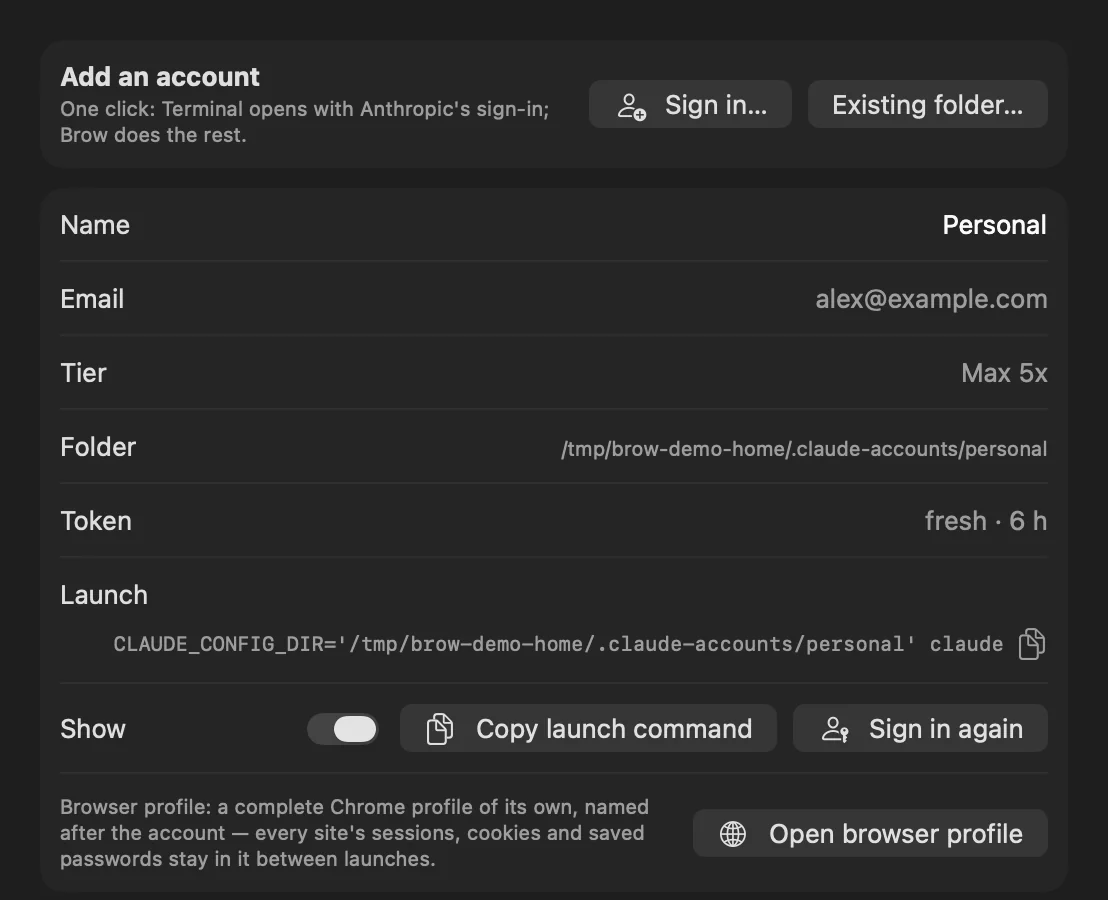
In Brow, the Sign in… button in Settings → Accounts does all of this:
- Brow creates the next free folder:
~/.claude-accounts/account-1, thenaccount-2, and so on. - Terminal opens and runs Anthropic’s own sign-in,
claude auth login, for that folder. The first time, macOS asks whether Brow may control Terminal. - The sign-in page opens in a browser profile that belongs to the new account.
- Brow watches the folder for up to ten minutes and adds the account once the sign-in lands.
Brow also marks Claude Code’s first-run setup as done in the new folder, so the first claude there skips it. The folder’s name doesn’t matter: Brow shows the account’s email, or a name you type in Settings.
Folders you sign in by hand inside ~/.claude-accounts/ show up at Brow’s next check; Brow skips names that start with a dot. For a folder anywhere else, use Existing folder… in the same tab. Brow tells accounts apart by their organisation, so two folders signed in to the same account show up once, with the other folder listed as an alias.
BROWSER part; in the installed app it does.Start Claude Code as a given account
Put the variable in front of claude:
CLAUDE_CONFIG_DIR=~/.claude-accounts/work claudeAnthropic’s documentation suggests an alias in ~/.zshrc, so that claude-work starts the work account while claude keeps the default one:
alias claude-work='CLAUDE_CONFIG_DIR=~/.claude-accounts/work claude'To use one account for everything in a terminal window, export the variable there:
export CLAUDE_CONFIG_DIR=~/.claude-accounts/workunset CLAUDE_CONFIG_DIR goes back to the default account. Inside a session, /status shows the account it runs as.
In Brow, the copy button next to each account in the panel, and Copy launch command in Settings → Accounts, copy the whole line. With Brow in /Applications, it looks like this:
CLAUDE_CONFIG_DIR='/Users/you/.claude-accounts/account-1' BROWSER='/Applications/Brow.app/Contents/Resources/brow-browser' claudeFor the default account the line starts with env -u CLAUDE_CONFIG_DIR instead, which removes the variable even in a terminal that has one exported:
env -u CLAUDE_CONFIG_DIR BROWSER='/Applications/Brow.app/Contents/Resources/brow-browser' claudePaste either line into any terminal. BROWSER points at Brow’s browser router, described next.
Keep each account’s browser sign-in apart
claude auth login finishes in a browser window, on claude.ai. Brow gives each account a browser profile of its own, with its own cookies, history and saved logins, so signing in to one account never disturbs another.
It does this through BROWSER. The sign-in and launch commands that Brow runs or copies set it to a small script inside Brow.app. When Claude Code opens a sign-in link, the script reads CLAUDE_CONFIG_DIR and opens the link in that account’s profile.
- The profiles are folders in
~/Library/Application Support/Brow/browser-profiles/, each named with the eight-character hash of the account’s folder path. - The script uses the first of Google Chrome, Chromium, Brave and Edge that it finds in
/Applications. With none of them, the link opens in your default browser, with no isolation. - A new account’s profile starts empty. Sign in to claude.ai there once and the profile keeps that sign-in. Open browser profile in Settings → Accounts, or the globe next to the account in the panel, opens claude.ai in it.
- When Claude Code reports “Login expired · Please run /login” for an account, Sign in again in Settings → Accounts, or the person-and-key button next to the account in the panel, runs
claude auth loginfor it in its own profile. Other accounts stay signed in.
Sign-ins that Brow starts already go through the script. For sign-ins you start yourself, in cmux or any other terminal, Settings → General → One browser profile per account shows a line to add to ~/.zshrc once:
export BROWSER='/Applications/Brow.app/Contents/Resources/brow-browser'The script reads CLAUDE_CONFIG_DIR itself, so one line covers every account. The line sets BROWSER for everything you start from that shell, not only Claude Code. Sessions that Grove starts get the script without it, as long as Brow is installed.
See every account’s limits at once
Each account has its own usage limits, a 5-hour limit and a weekly limit, and each resets on its own schedule. Inside Claude Code, /usage shows the plan usage limits of the account the session runs as. Brow shows every account at once, beside the MacBook notch:
- the 5-hour limit, the weekly limit and any model-specific weekly limit of each account, as percent used;
- when each one resets: a countdown such as “resets in 3 h 12 min” within a day, otherwise a date and time such as “resets 22 Sep 02:00”;
- a reset calendar with every account’s weekly resets and estimated subscription renewals on a month grid.
Brow checks every 30 seconds, and again when the Mac wakes or the network comes back. Reading the limits is not a model request. The one thing that can spend a little of an account’s limit is the fallback token refresh, which is on by default and can be turned off; what Brow does on your machine explains it.
For other ways to watch usage, from /usage to ccusage and menu-bar trackers, see how Brow compares with other usage tools.
Brow is free and open source, for macOS 26 or later on Apple silicon. Install it with Homebrew:
brew install --cask efim0v/tap/browOr download it from the latest release on GitHub. The build is not notarized, so the first launch needs Open Anyway; the install notes walk through it.
Questions
How do I switch Claude Code to another account?
Start it with that account’s folder, as above. Nothing is switched for the whole Mac: each claude runs as the account of the folder it started with, so two terminals can work as two accounts at the same time. To change the account a folder itself is signed in to, run /login in a session that uses it; the new login replaces the old one.
Can I continue a session under another account?
Not with CLAUDE_CONFIG_DIR alone: a session’s transcript is in the folder of the account that ran it. Grove, Brow’s companion app, moves sessions between accounts. Resume as… continues a session under another account without copying it. Migrate to… copies its transcript, memory, file history and tasks into the other account. Share moves it into a store that every linked account can see. Step by step: continue a Claude Code session on another account.
Where does each account keep its history and settings?
In its own folder. With CLAUDE_CONFIG_DIR set, every ~/.claude path in Anthropic’s guide to the .claude directory lives under that folder instead: transcripts in projects/, prompt history in history.jsonl, settings in settings.json.
Why does every folder use the same account?
Look for ANTHROPIC_API_KEY, ANTHROPIC_AUTH_TOKEN or CLAUDE_CODE_OAUTH_TOKEN in your shell. Each of them ranks above the login stored for a folder (an API key once you have approved it), so Claude Code uses it whichever folder you start with. claude auth status shows which login method is in use, and Anthropic’s authentication precedence has the full order.
Is Brow an account switcher?
No. Brow doesn’t change which account claude uses. It shows each account’s limits, copies the command that starts Claude Code as that account, and signs an account in again in its own browser profile.
Is it allowed to keep several accounts?
That is for Anthropic’s terms to answer, not for this guide. Read Anthropic’s Consumer Terms and Usage Policy for your plans.