
Continue a Claude Code session on another account
When one of your Claude accounts has used up its limit, a Claude Code session can carry on under another account, with its history. Grove has three ways to do it: Resume as…, Migrate to… and Share.
Switching models doesn’t help with a session or weekly limit: it covers every model, and Claude Code’s message says when it resets (Anthropic on usage limits).
Where Claude Code keeps an account’s sessions
Claude Code keeps an account’s settings, session history and plugins in one folder: ~/.claude by default, or the folder that CLAUDE_CONFIG_DIR names. Each folder also has its own sign-in: on a Mac, Claude Code keys the Keychain entry to the folder. Anthropic describes this under Log in with multiple accounts and Credential management.
Grove and Brow keep each extra account in ~/.claude-accounts/<name>.
Start Claude Code as the default account
claudeStart it as the account in ~/.claude-accounts/work
CLAUDE_CONFIG_DIR=~/.claude-accounts/work claudeA session’s transcript is a file in its account’s folder: projects/<project>/<session-id>.jsonl, where <project> is the session’s working directory with every character other than a letter or a digit turned into a hyphen (where transcripts are stored). So the work account’s sessions in /Users/you/Workspaces/acme-shop/loyalty-points are in its folder projects/.
List the work account’s project folders
ls ~/.claude-accounts/work/projectsEach folder has its own session history, so another account doesn’t see a session until its files are shared with that account’s folder or copied into it. Grove does one or the other.
Three ways to move a session in Grove
On a project’s Claude tab, a session you can resume has a Resume button, which continues it under its own account. Beside it, the tray icon opens Migrate to… and the chevron opens Resume as…, each with a line for every other account. Share is the share icon beside a session of an account other than ~/.claude, for example in an open workspace’s list of sessions on the Workspaces tab.
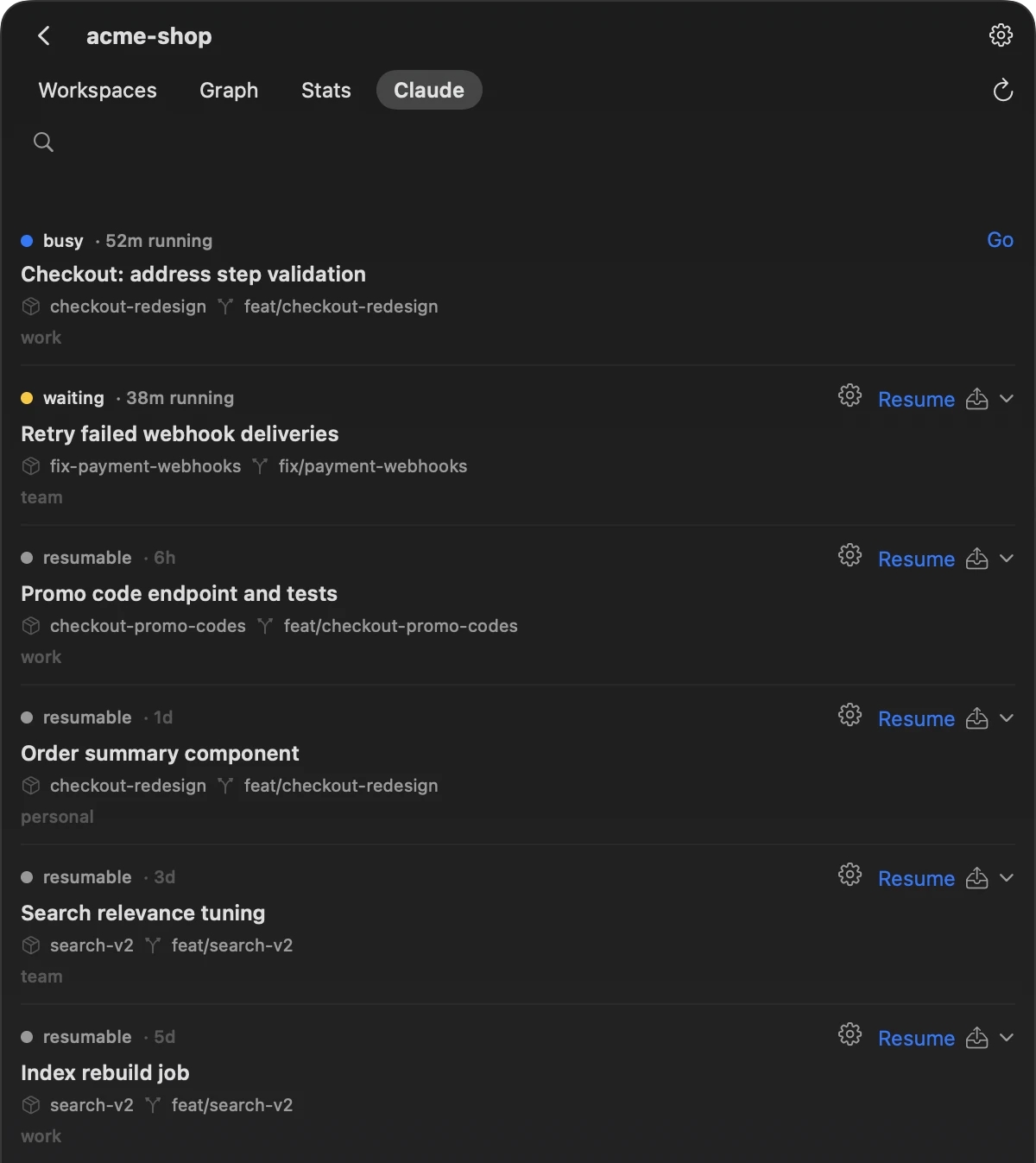
- Resume as…
- Continues the session under another account without copying it. Grove links the accounts involved to the shared store, which is the default account’s own
~/.claude, and starts Claude Code under the account you picked, in the session’s own directory. - Migrate to…
- Copies the session into another account, without linking the two. It works while that account is in use, and the source stays as it was.
- Share
- Moves a session of an account other than the default into the shared store,
~/.claude. It starts nothing.
Resume as…
- Exit Claude Code in the session, for example with
/exit, so that only one process writes it (one writer per session). - On the project’s Claude tab, open the chevron beside the session’s Resume and pick the account.
- Grove links the accounts if they aren’t linked yet, then opens the session in a new cmux workspace, in the session’s directory.
What Grove runs there is equivalent to this:
In the session’s directory, for the account in ~/.claude-accounts/work
CLAUDE_CONFIG_DIR=~/.claude-accounts/work claude --resume <session-id>For the default account it leaves CLAUDE_CONFIG_DIR out. It adds --model and --effort when the project or the account has a default, --dangerously-skip-permissions when the project has Skip permissions on, and BROWSER=… when Brow is installed. Before it starts Claude Code in a folder other than ~/.claude, it sets hasCompletedOnboarding in that folder’s .claude.json, so the session doesn’t open Claude Code’s first-run setup.
Resume as… opens the session in cmux. For Terminal.app, press the gear beside the session instead: the launch sheet has Account and Open in, and another account chosen there goes through the same linking.
Resume as… needs the default account, ~/.claude, among Grove’s accounts, because its folder is the shared store.
Migrate to…
Migrate to… copies into the target account’s folder:
- the transcript,
<session-id>.jsonl, and the folder of the same name beside it, if there is one; - the project’s auto memory, file by file, skipping files the target already has;
- the session’s entries in
file-history,tasksandsession-env.
It also merges into the target the project’s entry in .claude.json (for the default account, ~/.claude.json), a few settings.json keys such as enabled plugins, model and theme, and the source account’s plugins. Where the target already has a value or a file, the target’s stays. Grove writes those files under Claude Code’s own lock, and merges again if a file changes while it works. That is what lets it migrate into an account that is in use.
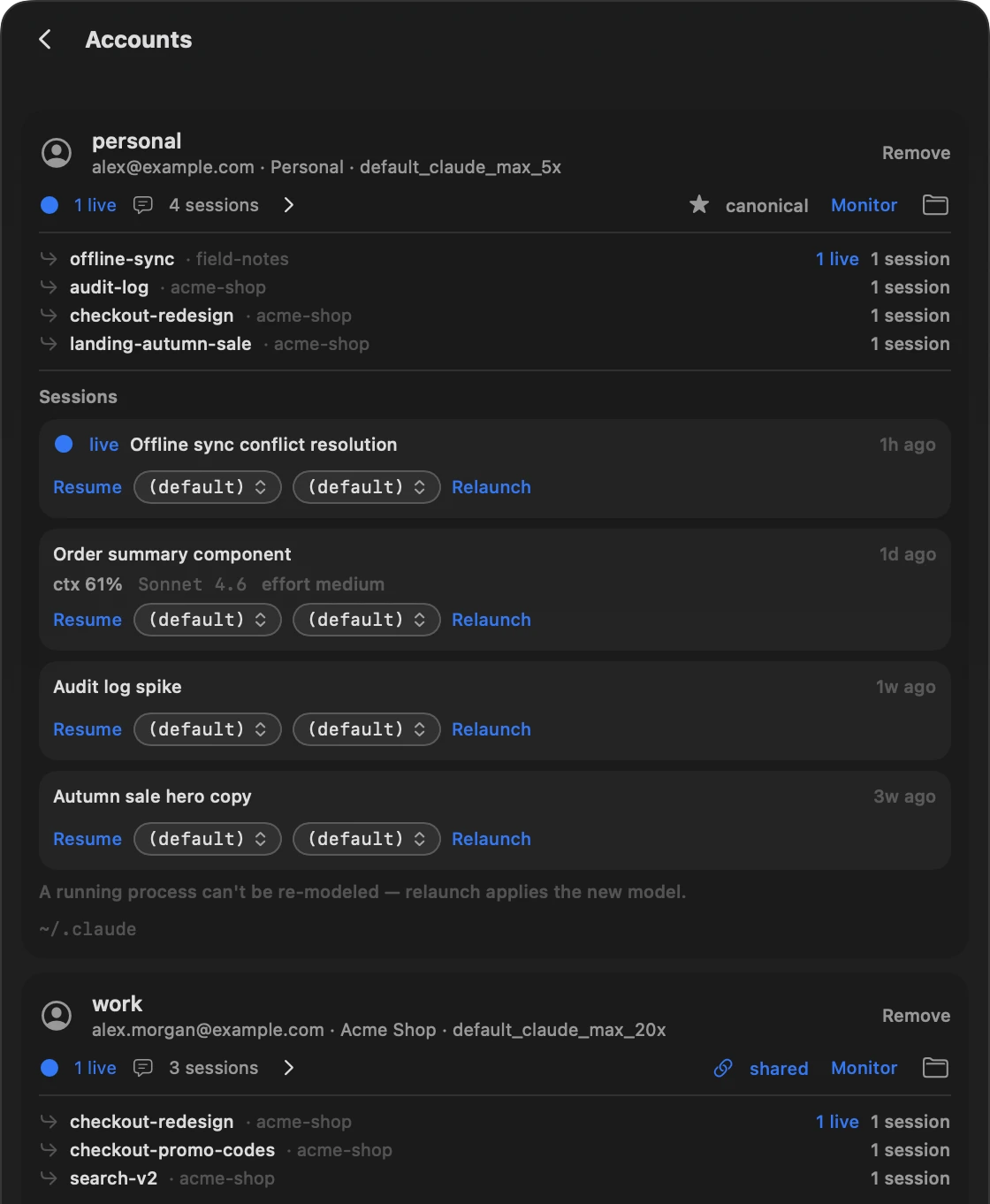
Migrate to… starts nothing and doesn’t link the accounts. The copy is listed as a session of the target account: on the Accounts screen, open that account’s sessions with the arrow beside its session count and press Resume. On the Claude tab the original and the copy share one row, and Resume as… from there links the two accounts.
Share
Share is for a session that belongs to an account other than ~/.claude. It links that account to the shared store (what linking changes on disk): the session’s project folder moves into ~/.claude with the account’s other sessions from the same directory, and a link takes its place. From then on the default account sees those sessions too, and Resume as… opens this one under any other account without a copy. Share refuses a session that is running, and it starts nothing.
What linking changes on disk
An account is linked the first time you use Resume as… or Share with it, or when you press Link to shared store on the Accounts screen. Linking works per account, not per session:
| In the account’s folder | After linking |
|---|---|
file-history, tasks, session-env | Symbolic links to the same folders in ~/.claude |
projects/<project> | A symbolic link to ~/.claude/ |
settings.json, plugins | Unchanged: Grove never shares them |
Link to shared store links file-history, tasks and session-env. A projects/<project> folder becomes a link only when a session in it is resumed under another account or shared. The sign-in stays with each account: Grove doesn’t read Claude Code’s credentials.
Before a real folder becomes a link, Grove moves into ~/.claude whatever ~/.claude doesn’t have yet. Where both sides have an entry, ~/.claude keeps its own, and the account’s copy goes to grove-backup/ in the account’s folder.
~/.claude itself is never a link: it is the store. The Accounts screen marks the default account canonical and each linked account shared.
See the links in an account’s folder
ls -l ~/.claude-accounts/work ~/.claude-accounts/work/projectsOne writer per session
A session is one transcript. Claude Code’s documentation warns that if you resume the same session in two terminals without forking, messages from both interleave into one transcript (Branch a session). Grove refuses the moves that could do that across accounts:
- Resume as… checks whether the session is running under another account. If it finds it running, Grove starts nothing and asks you to close it first.
- Share refuses a session that is running, because linking moves its files.
The Resume as… check looks for the session’s ID among running Claude Code processes, so it can miss a session that was started as a new one rather than resumed. Exit Claude Code in the session before you move it.
Pair it with Brow
Grove leaves usage limits to its companion app, Brow — Claude Code usage limits in the MacBook notch. For each account, Brow shows the 5-hour limit, the weekly limit and any model-specific weekly limit, with the time until each resets. Brow tells you which account has room; Grove moves the session there.
When Brow is installed, Grove passes Brow’s browser router to every session it starts, as BROWSER=…. If a session asks you to sign in again, the page opens in that account’s own browser profile. Separate profiles need Chrome, Chromium, Brave or Edge.
Questions
How do I set up the accounts?
In Grove, open Accounts at the bottom of the Projects screen, type a name and press Add & log in. Grove creates ~/.claude-accounts/<name> and starts Claude Code for it in a new cmux workspace, where you sign in. When Grove starts, it also adds every signed-in folder it finds in ~/.claude-accounts, such as the ones Brow’s Sign in… creates, and names each account after the email it is signed in with. To set accounts up by hand, see Use multiple Claude Code accounts on one Mac.
Does the session keep its history?
Yes. Resume as… continues the same transcript through the shared store. Migrate to… copies it and leaves the original as it was. Share moves it into ~/.claude, and the account reaches it through a link.
Which one should I use?
Resume as… to carry on now under another account, if you don’t mind the two accounts sharing session folders. Migrate to… to give an account its own copy and keep the accounts apart. Share to put a session of another account into the shared store without starting it yet.
How do I undo linking?
Linked accounts keep working without Grove, and Grove has no unlink button: the next Resume as… or Share with that account links it again. To give an account its own copies back, run this from the Uninstall section of Grove’s README while no Claude Code session uses the account. It replaces each link with a copy of the folder it points to.
In the account’s folder
cd ~/.claude-accounts/work
find file-history tasks session-env projects -maxdepth 1 -type l |
  while read -r link; do
    target=$(readlink "$link")
    rm "$link" && cp -R "$target" "$link"
  done
grove-backup/ in the account’s folder holds what linking set aside. Look through it before you delete it.
If you keep Grove, it still marks the account shared, and the Accounts screen reports its folders as not linked. Press Remove on the account to clear that: it changes only Grove’s list, and the next time Grove starts, it adds the signed-in folder back as an unlinked account.
Grove is free and open source, for macOS 26 or later on Apple silicon: install Grove. Everything else it changes in Claude Code’s folders is listed under What Grove changes on your Mac. For the workspaces themselves, see Run Claude Code across multiple repositories.