Parallel Claude Code sessions across multiple repositories

Grove, a menu-bar app and command-line tool for macOS, gives every feature of a multi-repo project its own workspace: one directory holding a git worktree of each repository you pick, all on the same branch. Start Claude Code there and it sees the whole product, and parallel sessions never trip over each other’s branches.

It also keeps your Claude Code sessions in view across projects and accounts, and moves a session from one Claude account to another.

Download Grove Source on GitHub

Or with Homebrew:

brew install --cask efim0v/tap/grove

Free and open source (GPL-3.0) · macOS 26 or later · Apple silicon
Version 0.2.0, (changelog) · Install notes

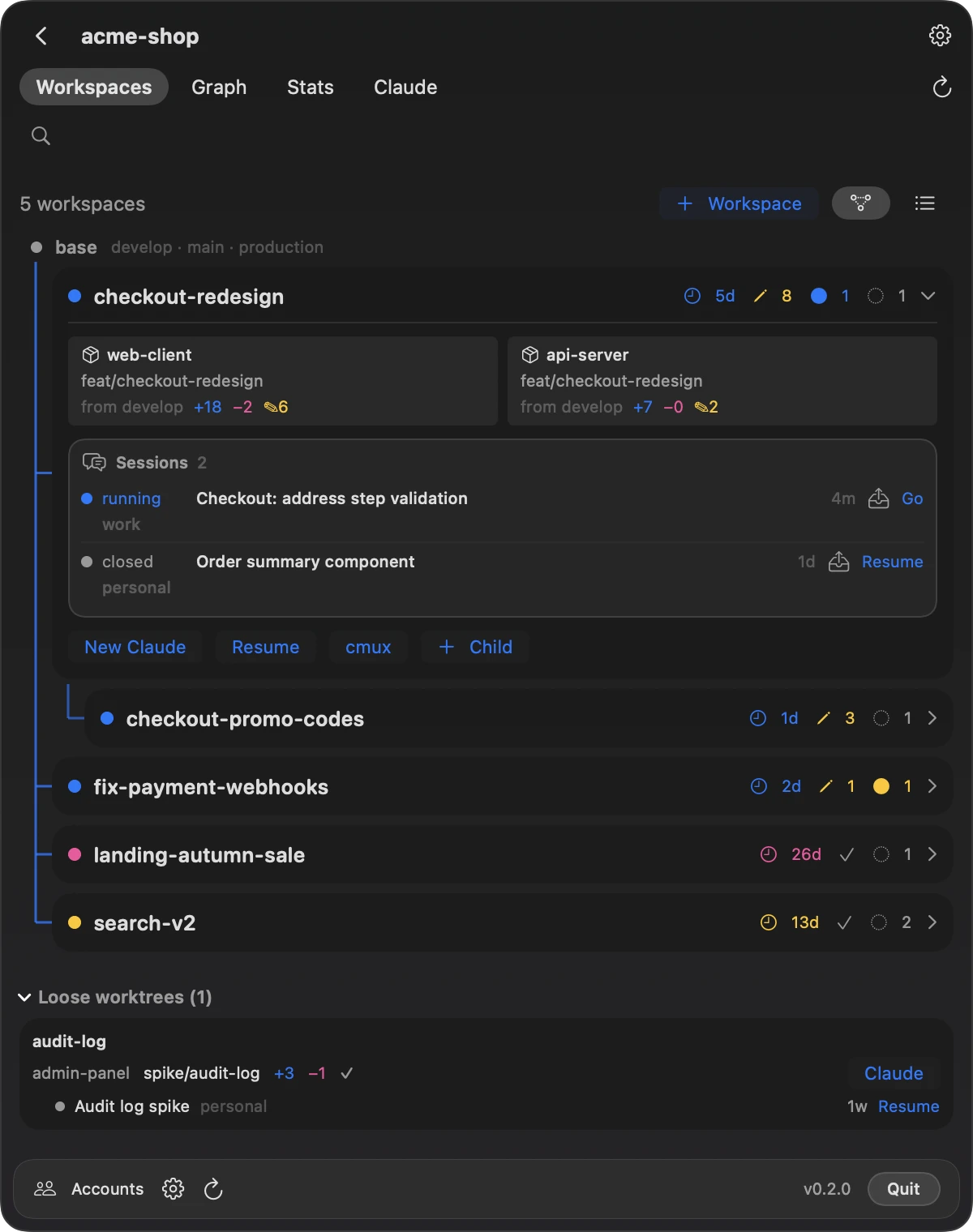
Grove’s Workspaces screen for a project called acme-shop: five workspaces in a tree, one opened to show worktrees of web-client and api-server on feat/checkout-redesign and the two Claude Code sessions in it.
Screenshots show made-up demo data.

One workspace per feature: a git worktree of every repository, on one branch

Claude Code works best when it sees the whole product in one directory. When the product is split across repositories, parallel sessions start tripping over branches: one checks out a branch in the server repository, and another, working on a different feature, is suddenly looking at the wrong code.

A Grove workspace is a directory for one feature that holds a git worktree of each repository you pick, all on the same branch. Claude Code starts in that directory with its own working copy of the whole product, and nothing another session does can switch the branch under it.

# start Claude Code here:
~/Workspaces/acme-shop/checkout-redesign/
├── web-client/     feat/checkout-redesign
├── api-server/     feat/checkout-redesign
└── server-config/  feat/checkout-redesign

What is a git worktree?

A git worktree is an extra working directory of a repository, with its own files and its own checked-out branch, sharing the repository’s history and remotes. Running each Claude Code session in its own worktree lets one session build a feature while another fixes a bug. A Grove workspace does this for every repository of a product at once, under one directory.

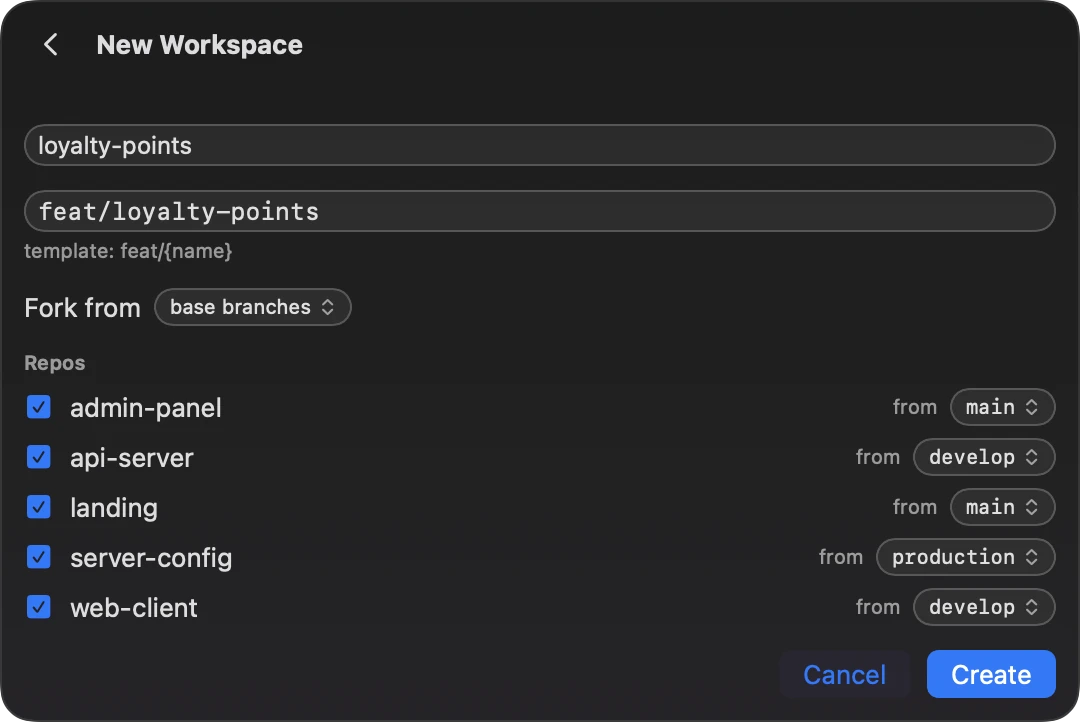
The New Workspace form: the name loyalty-points, the branch feat/loyalty-points from the template feat/{name}, Fork from set to base branches, and five repositories ticked, each with its own base branch.
A name and a click: Grove runs git worktree add in each repository.

Grove workspaces vs claude --worktree

Claude Code’s own --worktree starts a session in a new worktree of the repository you run it in. If your product lives in one repository, that may be all you need. For a product split across repositories:

claude --worktreeGrove workspace
RepositoriesThe repository you run it inEvery repository you pick, under one directory
Location.claude/worktrees/<name>/ at the repository root; elsewhere through a WorktreeCreate hook, or with git worktree add yourself~/Workspaces/<project>/<name> by default, set by a template
Branchworktree-<name>From a template, feat/{name} by default
Start pointworktree.baseRef: fresh (the remote default branch) or head (your local HEAD); it can’t name a branch. Given a pull request number or URL, the worktree starts from that pull request.A base branch per repository, from origin/HEAD or set by hand, or another workspace’s branches
Files outside git.worktreeinclude copies gitignored files such as .envFiles you choose, such as CLAUDE.md, linked or copied to the workspace root or into each repository
SetupAsk Claude, or run your setup yourself; a WorktreeCreate hook can replace creationA post-create hook per repository
CleanupOn exit, removes the worktree of an unnamed session if it is clean, and asks otherwiseWorkspaces stay until you remove them with git worktree remove. If creating one fails, the app offers to roll back what that run created.
Accounts—Resume as…, Migrate to…, Share

Claude Code facts from its worktree documentation, checked on 13 October 2026.

Set up each workspace the way your project works

  • Branches from the right place. Each repository starts from its own base branch, detected from origin/HEAD or set per repository, or from another workspace’s branches, so workspaces can be stacked.
  • Branch names from a template, feat/{name} by default.
  • Shared files in every workspace. Files such as CLAUDE.md are linked or copied into each new workspace, at its root or into each repository.
  • Post-create hooks. Each repository can run its own shell command in its new worktree.
  • Launch defaults. Each project has a default Claude account, model and effort.
  • State at a glance. Every workspace shows its age, its uncommitted changes and its sessions.
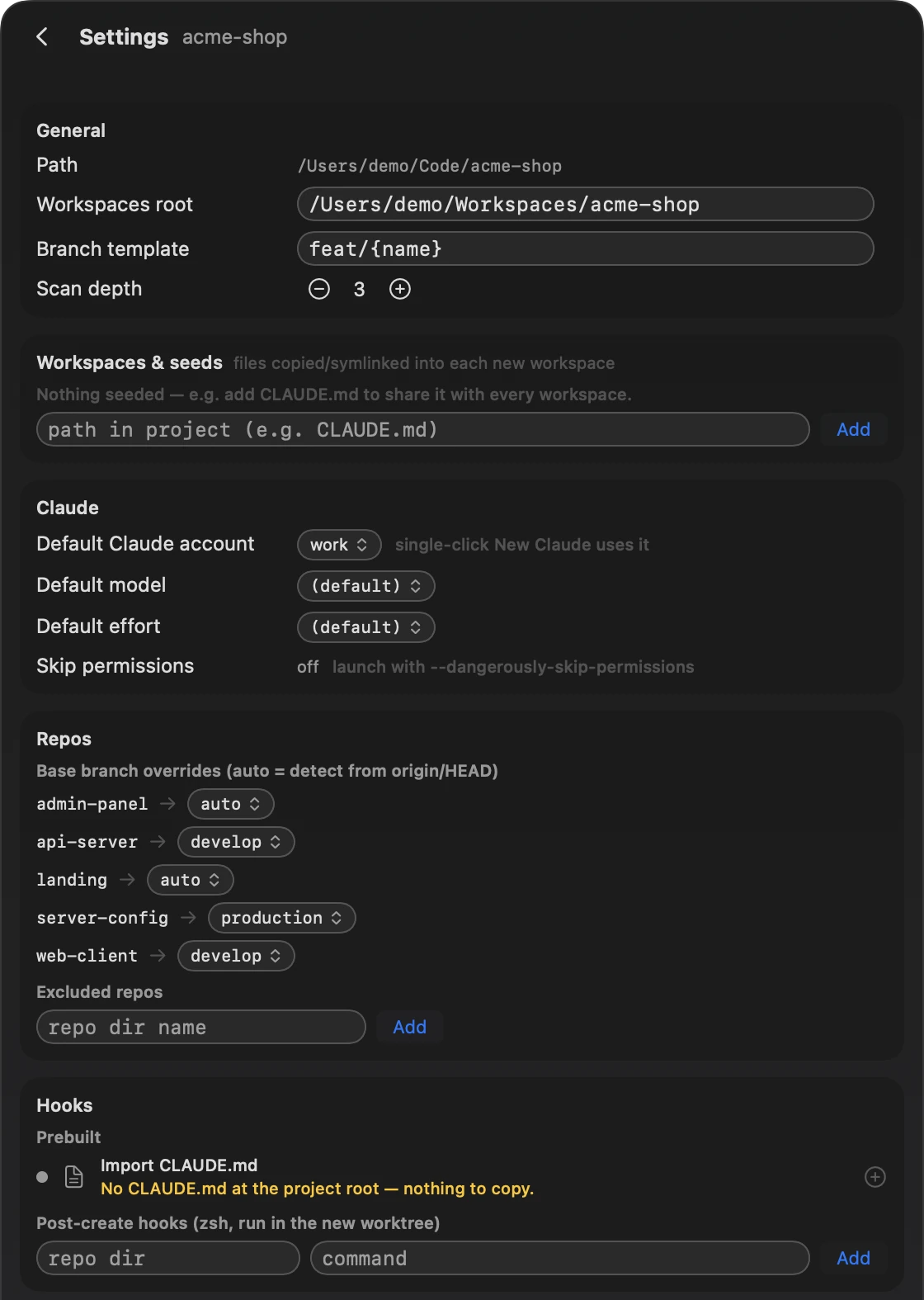
A project’s settings: workspaces root, branch template feat/{name}, seed files, the default Claude account, model and effort, base-branch overrides for each repository, and post-create hooks.

Every Claude Code session in view, across projects and accounts

Grove finds the Claude Code sessions of every project and workspace, across your accounts. It shows which are running, which are waiting for you and which are closed. On the Projects screen, one click takes you to a running session, in cmux or Terminal.app.

  • New or resumed. The launch sheet picks the account, model and effort, and opens the session in cmux or Terminal.app.
  • Grouped by where the work is: by project and by workspace, with each session’s branch and account.
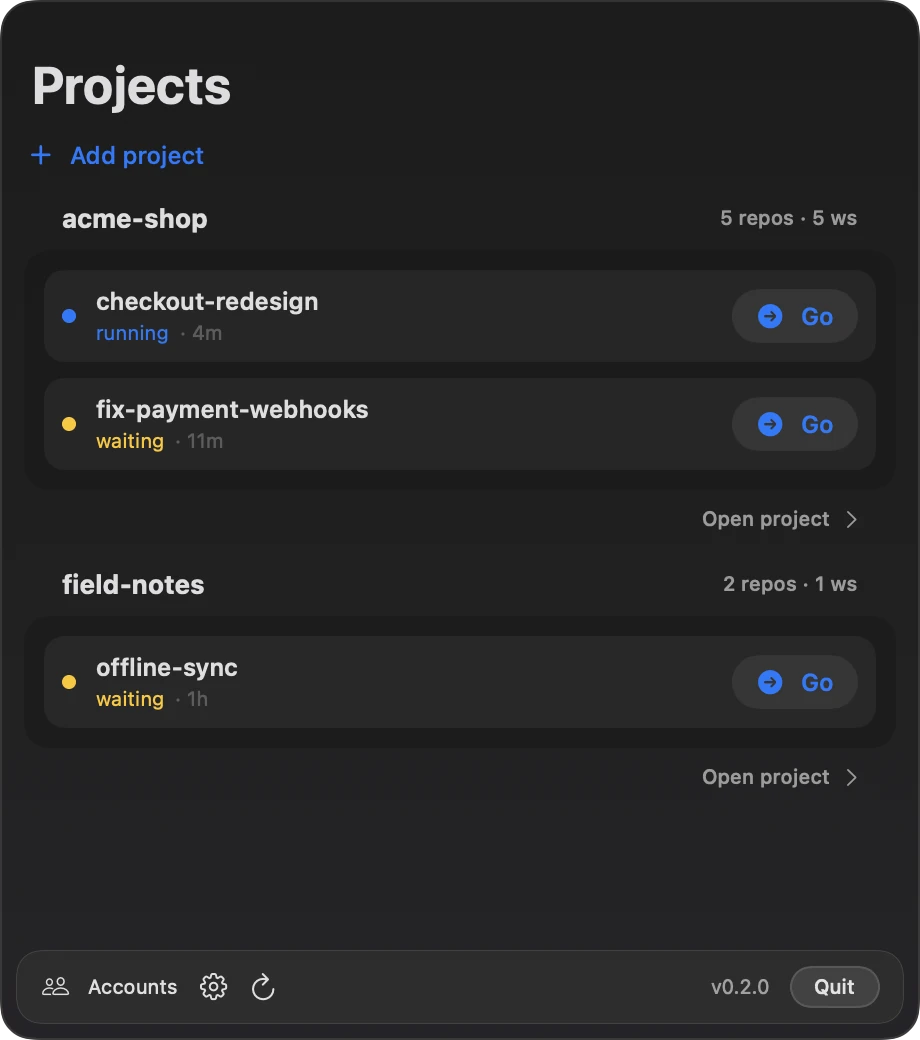
The Projects screen: two projects, acme-shop and field-notes, with their running and waiting sessions and a Go button for each.
Projects and the sessions running in them.
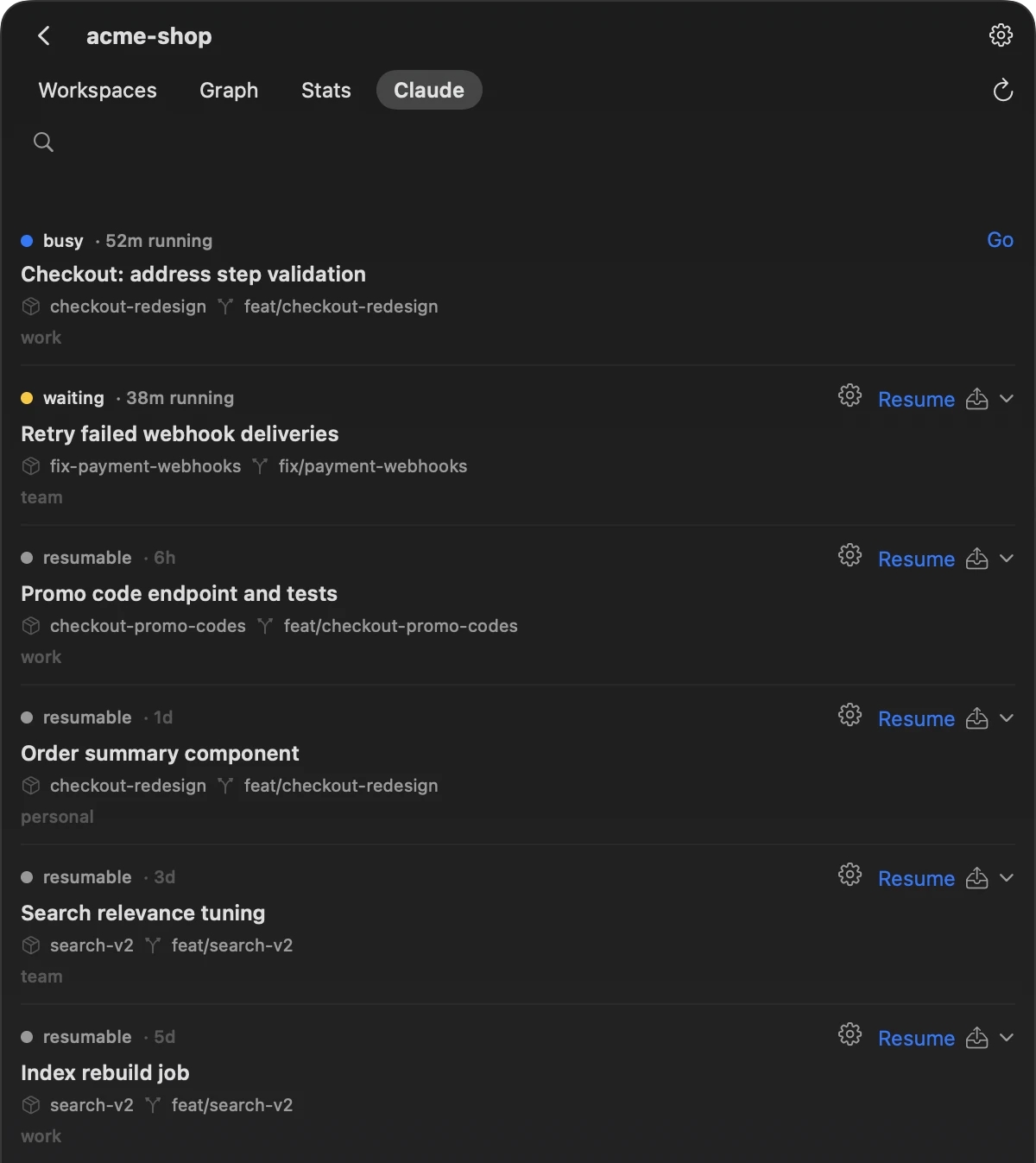
A project’s Claude tab: sessions with their status, workspace, branch and account, each with a Go or Resume button.
A project’s sessions, live ones first.

Move a Claude Code session to another account

Claude Code keeps each account in a folder of its own: ~/.claude for the default account, and ~/.claude-accounts/<name> for each account you add in Grove. A session doesn’t have to stay on the account it started on. Continue it under another of your accounts, for example when one has used up its limit.

Resume as…
Continues a session under another account without copying anything: linked accounts share their session folders through ~/.claude.
Migrate to…
Copies a session into another account (transcript, memory, file history, tasks), even while that account is in use.
Share
Moves a session into the shared store, where every linked account can see it.
One writer per session
Grove refuses a move that would give a session two writers, such as resuming under one account a session that is still running under another.

Step by step: Continue a Claude Code session on another account.

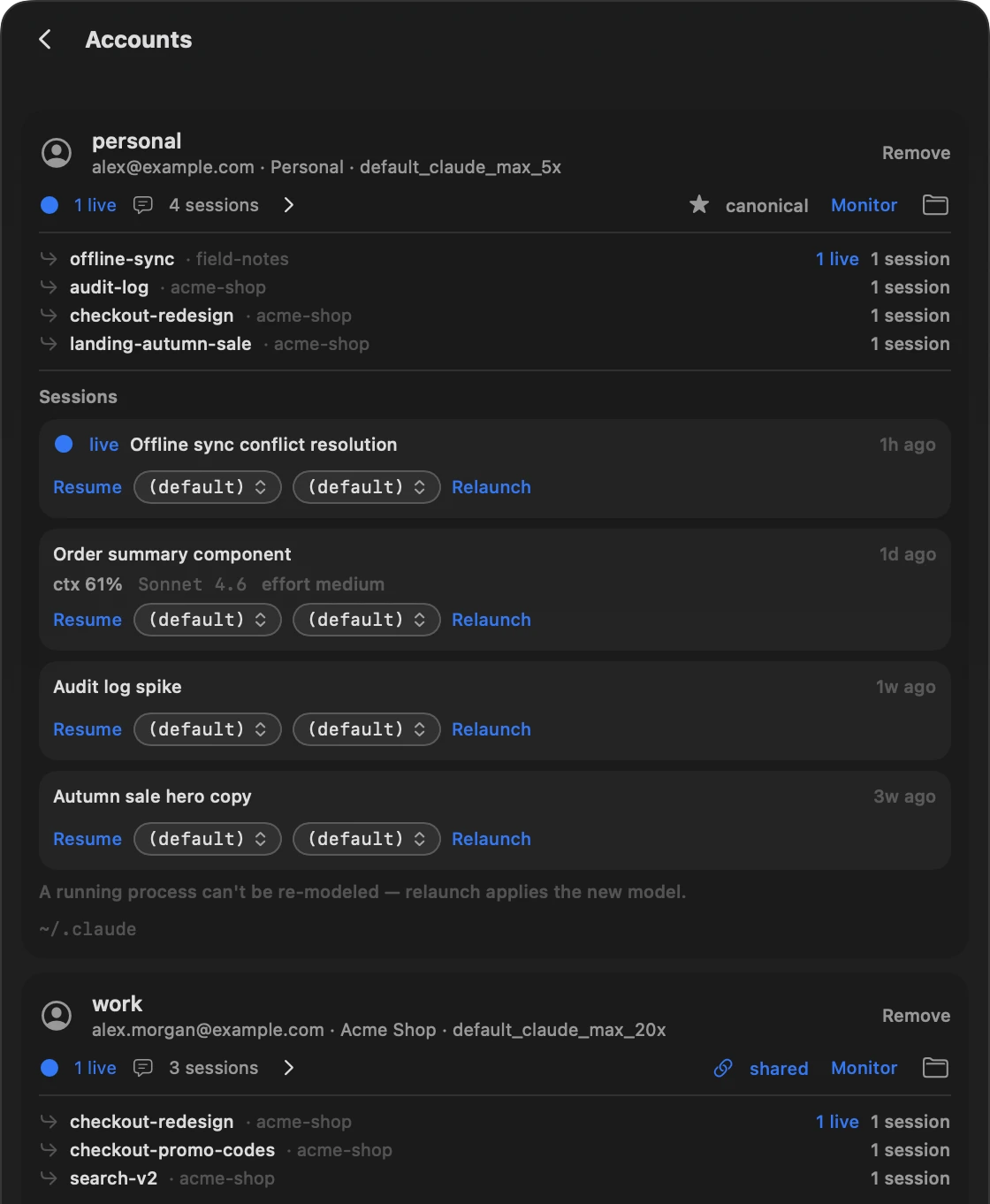
The Accounts screen: the personal account, marked canonical, with its sessions and their model and effort pickers, and below it the work account, marked shared.

Transcripts that outlast Claude Code’s 30-day cleanup

Claude Code deletes session transcripts older than cleanupPeriodDays, 30 days by default. Grove keeps a hard link to every transcript in ~/.claude/grove/transcripts/ and restores a transcript that disappears from an account, whether you deleted it or Claude Code’s cleanup did, for up to 90 days and 500 MB by default.

Change both limits, or turn the mirror off, in Settings → Transcript safety-net. Purge on the Sessions screen deletes a transcript for good.

Commit graph and code statistics across repositories

Graph
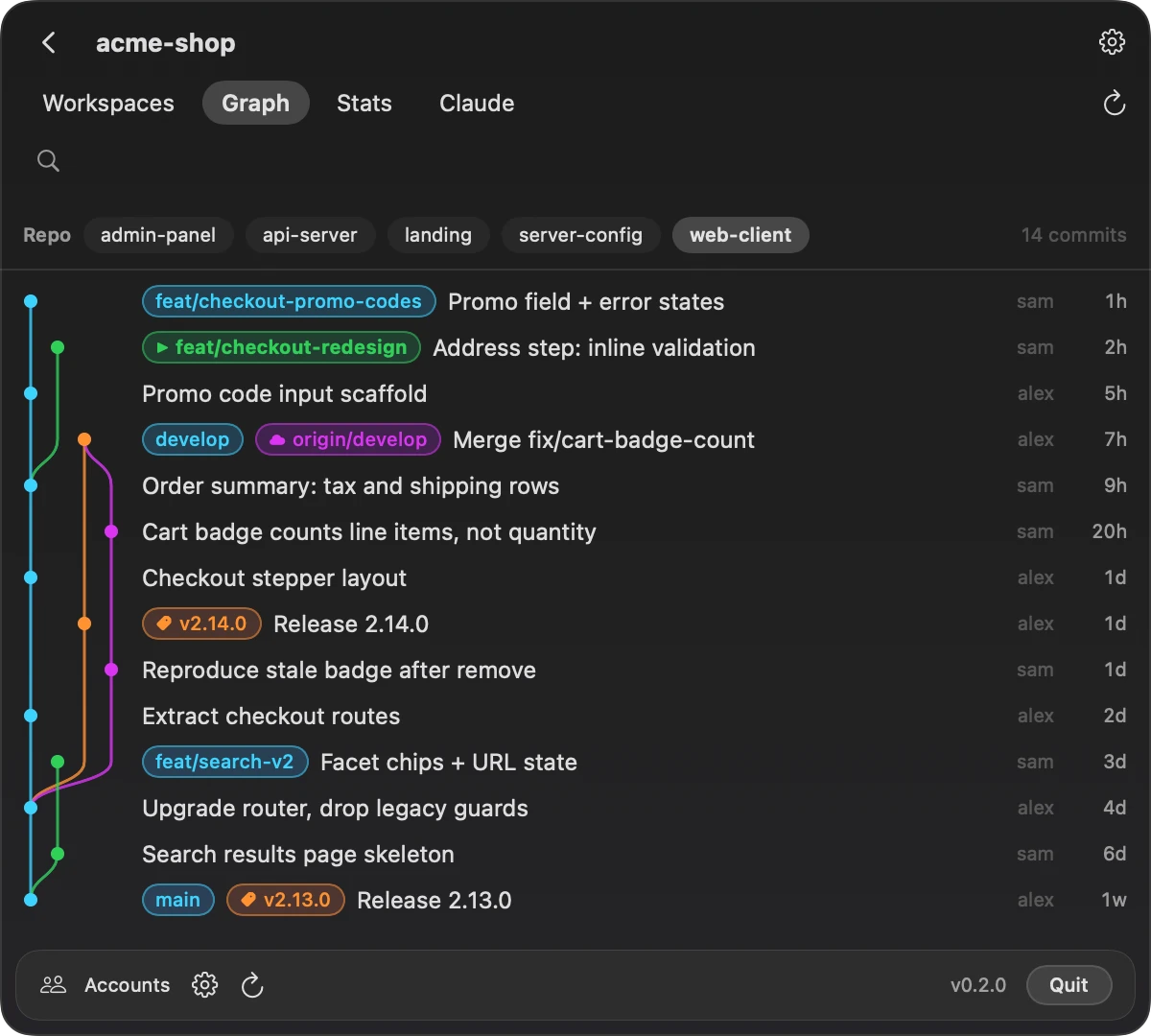
The commit graph of each repository, with branches, remotes and tags. From a branch, create a workspace or open Claude Code in its worktree.
Stats
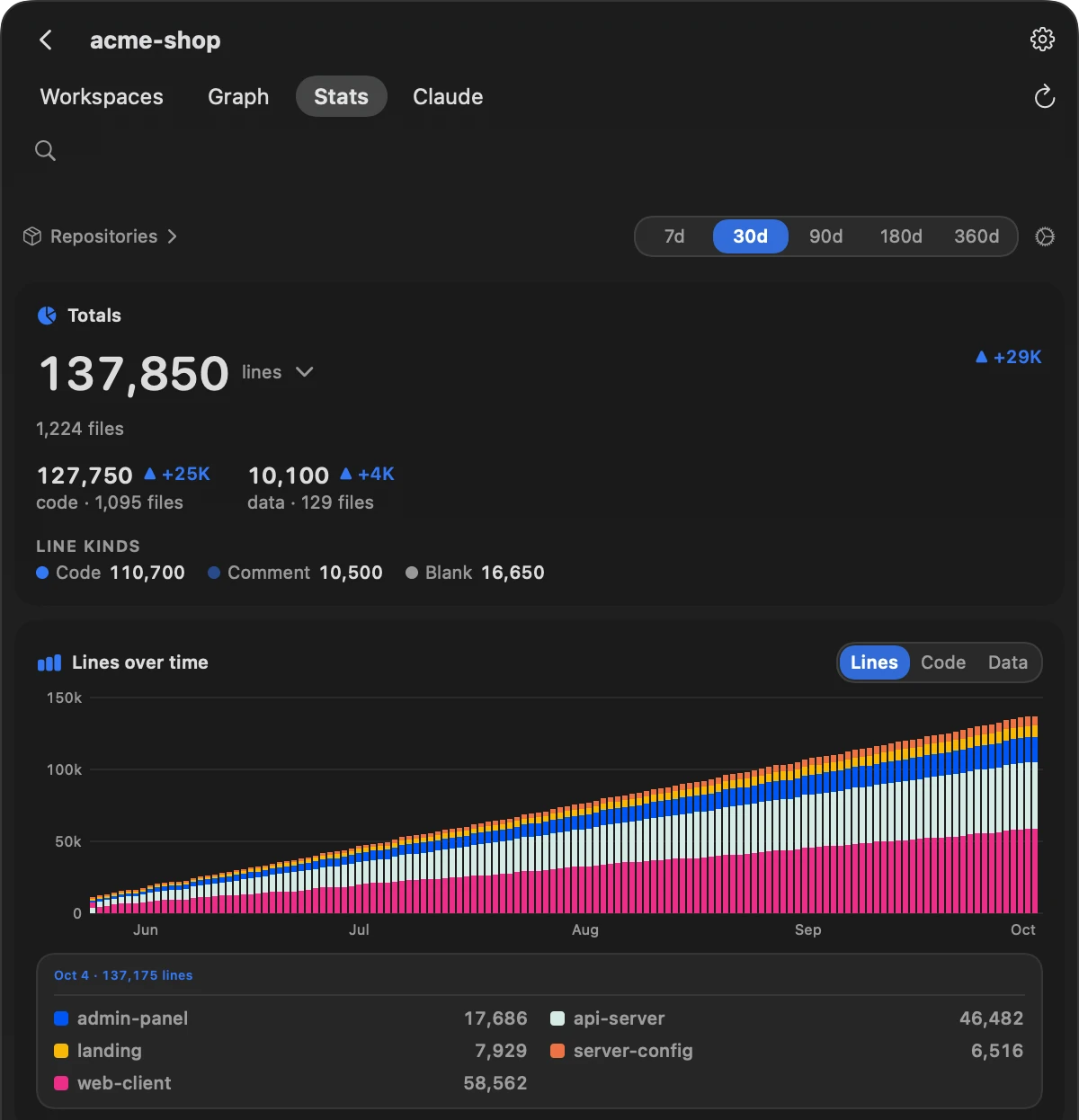
Lines of code across the project, with totals, languages and growth over time, stacked by repository.
The Graph tab: the commit graph of the web-client repository with feature branches, develop, origin/develop and release tags.
The commit graph of one repository.
The Stats tab: 137,850 lines across the project, split into code and data, and a chart of lines over time stacked by repository.
Lines of code across five repositories.

The grove CLI: multi-repo worktrees from a terminal or a script

The grove command-line tool works with the same workspaces: scan, workspaces, sessions, create, graph and doctor. Each command takes --json.

# repositories and their worktrees
grove scan ~/code/acme-shop

# the project’s workspaces, as a tree
grove workspaces ~/code/acme-shop

# a workspace with two of the repositories
grove create ~/code/acme-shop loyalty-points \
  --repos api-server,web-client

# sessions in a directory, as JSON
grove sessions ~/Workspaces/acme-shop/loyalty-points --json

# are git, claude and cmux installed?
grove doctor

The CLI uses Grove’s default layout, ~/Workspaces/<project>/<name> on feat/<name>, rather than the app’s per-project settings.

How Grove compares

Many tools run Claude Code in parallel. The facts below come from each tool’s own site or README.

Tool What it is Platforms Repositories per task Agents Moves a session to another account License
claude --worktreeBuilt into Claude Code: a session in a new worktreeWherever Claude Code runsThe repository you run it inClaude Code—Part of Claude Code
ConductorMac app for parallel coding agents in isolated workspaces; agents can also run in cloud sandboxesmacOS, iOSNot statedClaude Code, Codex, Cursor, OpenCodeNot statedNot stated
Claude SquadTerminal app on tmux and git worktreesNot stated; needs tmuxNot statedClaude Code, Codex, Gemini, Aider, othersNot statedAGPL-3.0
NimbalystVisual workspace; any session can get its own worktreemacOS, Windows, Linux, iOSNot statedClaude Code, Codex; OpenCode and Copilot in alphaNot statedMIT
SupersetRuns many coding agents in parallel, each in its own worktreemacOS, iOS; Linux experimental; no Windows yetNot statedAny CLI agentNot statedElastic License 2.0 (source-available)
EmdashOpen-source agentic development environment; parallel tasks in separate worktreesmacOS, Windows, LinuxNot stated25+ agentsNot statedApache-2.0
Vibe KanbanKanban board for coding agents; its README says it is sunsettingNot statedNot statedClaude Code, Codex, othersNot statedApache-2.0
WorktrunkCLI for git worktree managementmacOS, Linux, WindowsNot statedClaude Code, Codex, othersNot statedMIT or Apache-2.0
ivarCLI: one feature across repos, one branch, one plan, one PR per repomacOS, LinuxSeveral, on one branchClaude Code, OpenCode, OMPNot statedApache-2.0
gw (nicksenap/grove)CLI: a workspace folder with worktrees from several repos on one branchmacOS, LinuxSeveral, on one branchVendor-neutralNot statedMIT
claude-swapCLI, with an optional macOS menu bar, that switches the active Claude Code account; can switch before a limit; usage dashboardWindows, macOS, Linux/WSL—Claude CodeSwitches the account; the current session can continueMIT
cmux (works with Grove)macOS terminal for AI coding agentsmacOS—Any CLI agentNot statedGPL-3.0 or later
GroveMenu-bar app and CLI: multi-repo workspaces, Claude Code sessions across accountsmacOS 26 or later, Apple siliconSeveral, on one branchStarts and lists Claude Code; a workspace is an ordinary directoryResume as…, Migrate to…, ShareGPL-3.0

Checked on 13 October 2026. “Not stated” means the tool’s own page or README doesn’t say; a dash means the column doesn’t apply to that tool.

When another tool fits better:

  • One repository: claude --worktree.
  • Windows or Linux: Emdash or Nimbalyst.
  • Multi-repo worktrees from the command line on Linux: ivar or gw.
  • Several different agent CLIs in one window: Claude Squad, Superset or Emdash.
  • Automatic account switching before a limit: claude-swap.
  • A terminal built around agents: cmux, which Grove opens sessions in.

Grove fits a product split across several repositories that you work on with Claude Code on a Mac, under one account or several.

Questions people ask about Grove

How do I run several Claude Code sessions at once without them colliding?

Give each task its own working copy, a git worktree; Anthropic documents this for parallel sessions. For a product split across repositories, a Grove workspace holds a worktree of each repository on one branch. Start Claude Code in that directory.

Can Claude Code work on multiple repositories at once?

--add-dir gives a session access to more directories, and permissions.additionalDirectories makes that persistent. It grants file access, and Claude Code doesn’t pick up most .claude/ configuration from those directories. A Grove workspace puts every repository, already on the feature’s branch, under the directory Claude Code starts in. Guide: Run Claude Code across multiple repositories.

How is a Grove workspace different from claude --worktree?

See the table above. In short, --worktree covers one repository, and a workspace covers every repository you pick, on one branch.

Can I choose the base branch, branch name and folder for each workspace?

Yes. Each repository has its own base branch, branch names come from a template, and the workspace root is set by a template.

How do CLAUDE.md and other shared files get into each workspace?

List them as seed files in the project’s settings. Grove links or copies each one into every new workspace, at its root or into each repository.

How do I continue a Claude Code session under another account?

  • Resume as… continues it under another account without copying anything.
  • Migrate to… makes a full copy.
  • Share moves it into the shared store.

Grove refuses a move that would give a session two writers. Guide: Continue a Claude Code session on another account.

Will I lose session history when I switch accounts?

Linked accounts share their session folders through ~/.claude, so a session started under one linked account is visible to the others. Credentials, settings and plugins stay with each account.

Why do old Claude Code sessions disappear, and can I keep them?

Claude Code deletes transcripts older than cleanupPeriodDays, 30 days by default. Grove’s transcript mirror keeps them for up to 90 days and 500 MB by default, and you can turn it off.

How many Claude Code sessions can I run at once?

Grove sets no limit of its own. Every session counts toward the usage limits of the account it runs under. Grove lists the sessions by project and workspace and shows which are running and which are waiting for you.

Do I need cmux?

It’s recommended, not required. The launch sheet can open a session in Terminal.app; the other buttons that start or resume a session, such as Resume and Resume as…, open it in cmux. You can also start Claude Code in a workspace yourself, from any terminal.

Does Grove work with Codex or other agents?

A workspace is an ordinary directory, so you can start any CLI agent in it yourself. Grove starts, lists and moves Claude Code sessions only.

Can I resume a session from another directory?

Yes. Grove lists the sessions of every project and resumes each one with claude --resume in the session’s own directory.

Why does macOS block the first launch?

Grove is signed ad hoc and not notarized by Apple. Use Open Anyway in System Settings → Privacy & Security once; First launch has the steps.

Which Macs does Grove run on?

Macs with Apple silicon, on macOS 26 or later.

Is Grove free and open source?

Yes, under the GNU GPL v3. Version 0.2.0 and earlier were released under the MIT License.

What you need

You needNotes
macOS 26 or later on a Mac with Apple silicon
Claude Code and git
cmux (recommended) or Terminal.appFor the sessions
An account signed in at the default ~/.claudeFor Resume as… across accounts and for the transcript mirror
Optional: Brow — Claude Code usage limits in the MacBook notchWhen it is installed, Grove passes Brow’s browser router to the sessions it launches, so a sign-in opens in that account’s own browser profile.

Works with cmux or Terminal.app

Grove is built around cmux: it opens each session in a cmux workspace of its own and switches to a running session in one click. Terminal.app works too. The launch sheet, which opens for New Claude, for the gear next to a closed session and for a closed session on the Projects screen, has an Open in: Terminal option, and Grove can bring a session running in Terminal.app to the front. Every other button that starts or resumes a session, such as Resume, Resume as… and Add & log in, opens it in cmux.

A workspace is an ordinary directory, so you can also start Claude Code in it from any terminal yourself.

Install Grove

Grove is free and open source. It needs macOS 26 or later on a Mac with Apple silicon.

With Homebrew

The menu-bar app

brew install --cask efim0v/tap/grove

The grove command-line tool, if you want it

brew install efim0v/tap/grove-cli

From the release

Download Grove.zip from the latest release, unzip it and move Grove.app to /Applications. The release also has grove-cli.zip, the command-line tool, and SHA256SUMS.txt.

Check what you downloaded

shasum -a 256 -c --ignore-missing SHA256SUMS.txt

First launch

Grove is signed ad hoc and is not notarized by Apple, so macOS blocks the first launch. That holds for the Homebrew install too, because Homebrew puts macOS’s quarantine flag on cask downloads.

  1. Open Grove from your Applications folder; macOS blocks it.
  2. Open System Settings → Privacy & Security, find the message about Grove, click Open Anyway and confirm with Open.
  3. Click the tree icon in the menu bar, open Settings, press Add project… and pick the folder that contains your repositories. Workspaces go to ~/Workspaces/<project>/<name> unless you change the template.

Or clear the quarantine flag yourself, on the app and on a grove binary you downloaded through a browser:

xattr -dr com.apple.quarantine /Applications/Grove.app
xattr -d com.apple.quarantine grove

macOS may also ask you to let Grove control cmux or Terminal (System Settings → Privacy & Security → Automation).

Grove is licensed under the GNU GPL v3; version 0.2.0 and earlier were released under the MIT License.
What Grove changes on your Mac

Grove works inside Claude Code’s own folders. This is everything it changes there, and how to undo it.

What Grove doesn’t do. It doesn’t read Claude Code’s credentials; sign-in and rate limits are Brow’s job. It has no telemetry and makes no network requests of its own, and its git commands never fetch, pull or push.

The status line in each account

At launch, Grove points statusLine.command in each account’s settings.json at a small wrapper script in ~/Library/Application Support/Grove/bin/. The wrapper saves what Claude Code sends to the status line (model, context, cost) in the account’s grove/usage/ folder, then runs the command you had with the same input, so your own status line keeps working.

Stop next to monitoring on the Accounts screen puts your command back.

Linked accounts share session folders

An account is linked when you press Link to shared store on the Accounts screen, share one of its sessions, or resume a session as another account for the first time. Its file-history, tasks and session-env folders, and projects/<workspace> for each workspace involved, then become symbolic links into ~/.claude.

Anything that would be overwritten is moved to <account>/grove-backup/ first. Credentials, settings and plugins are never shared.

Migrate to… writes into the other account

Besides the session’s own files, Migrate to… merges into the target account that project’s entry in .claude.json, a few settings.json keys such as enabled plugins, model and theme, and the source account’s plugins. It never overwrites what the target account already has.

The transcript mirror outlasts Claude Code’s cleanup

Grove keeps a hard link to every session transcript in ~/.claude/grove/transcripts/ and restores a transcript that disappears from an account, including one you deleted yourself. A hard link takes no extra disk space while the original file exists. By default the mirror keeps transcripts for up to 90 days and 500 MB.

Purge on the Sessions screen deletes a transcript for good. To leave retention to Claude Code, turn off Keep a backup of every session in Settings → Transcript safety-net, then delete ~/.claude/grove/transcripts/.

A first-run flag in other account folders

Before it starts Claude Code in an account folder other than ~/.claude, Grove sets hasCompletedOnboarding in that folder’s .claude.json, and copies your theme from ~/.claude.json if the folder has none, so the session doesn’t open Claude Code’s first-run setup.

Grove’s own files

~/Library/Application Support/Grove/ holds Grove’s settings (config.json), the status-line wrappers (bin/) and code statistics (stats/).

Workspaces are ordinary git worktrees and branches in your repositories.

How to undo these changes
  1. On the Accounts screen, press Stop next to monitoring on each account. Grove puts back the status-line command it saved, or removes the key if there was none.
  2. Quit Grove and remove it: brew uninstall --cask grove (and brew uninstall grove-cli for the command-line tool), or move Grove.app to the Trash. defaults delete dev.artemefimov.grove3 removes its preferences.
  3. Delete ~/.claude/grove/ (the transcript mirror and status-line captures), the grove/ folder in every other account folder, and ~/Library/Application Support/Grove/. A transcript that only the mirror still holds goes with it. If you use Brow, keep oauth-usage-ledger.json in that last folder: it is Brow’s.
  4. Linked accounts keep working without Grove. Look through any grove-backup/ folder before you delete it.
  5. Workspaces stay: they are git worktrees. Remove one with git worktree remove in each of its repositories, then delete its directory.

Brow shows which account has room

Brow lives in the MacBook notch and shows the usage limits of every Claude account you have. Grove moves work between accounts; Brow tells you which account has room. Each runs on its own, and they are built to be used together. Brow’s guide explains how to use multiple Claude Code accounts on one Mac.

Brow — Claude Code usage limits in the MacBook notch · Brow on GitHub