
Run Claude Code across multiple repositories
Many products are split across repositories: a client, a server, the server’s configuration, an admin panel, a landing page, a handful of microservices. Merging them into one repository isn’t always sensible, if only because of who should have access to what.
Claude Code starts in one directory, and by default it has access to the files there. Give it the other repositories and run a few sessions in parallel, and they start tripping over branches: one session checks out a branch in the server repository, and another, working on a different feature, is suddenly looking at the wrong code.
There are two ways to give one session several repositories: add them as extra directories, or start the session in a directory that holds a git worktree of each repository, all on the same branch. Grove, a menu-bar app and command-line tool for macOS, builds the second for you, and plain git can too.
Option 1: one session with extra directories (--add-dir)
Start Claude Code in one repository and add the others with --add-dir:
cd ~/code/acme-shop/web-client
claude --add-dir ../api-server ../server-config
In a session that is already running, /add-dir adds a directory:
/add-dir ../api-serverTo have them added every time you start Claude Code in web-client, list them under permissions.additionalDirectories in its .claude/settings.local.json:
{
  "permissions": {
    "additionalDirectories": [
      "../api-server",
      "../server-config"
    ]
  }
}
What this gives the session:
- File access. Claude can read and edit files in the added directories under the same permission rules as in the one you started in.
- Only some of their configuration. Claude Code doesn’t discover most
.claude/configuration in added directories. Skills, commands and subagents load from directories added with--add-diror/add-dir. TheirCLAUDE.mdfiles load only whenCLAUDE_CODE_is set. Directories inADDITIONAL_ DIRECTORIES_ CLAUDE_MD=1 permissions.additionalDirectoriesgive file access and nothing else. - No branches of their own. The added directories are your usual checkouts. When another session checks out a branch in one of them, this session is looking at that branch too.
To have the other repositories’ CLAUDE.md files loaded as well:
CLAUDE_CODE_ADDITIONAL_DIRECTORIES_CLAUDE_MD=1 \
  claude --add-dir ../api-server ../server-config
Starting Claude Code in the folder that holds all the checkouts gives the same file access without flags, and each repository’s CLAUDE.md loads once Claude works on files in it. The checkouts are still the ones every other session uses.
cd ~/code/acme-shop
claude
Option 2: a workspace of worktrees, one branch across all repositories
A git worktree is an extra working directory of a repository, with its own files and its own checked-out branch, sharing the repository’s history and remotes. A workspace is a directory for one feature that holds a worktree of each repository you pick, all on the same branch. Claude Code starts in the workspace directory:
# start Claude Code here:
~/Workspaces/acme-shop/loyalty-points/
├── api-server/   feat/loyalty-points
└── web-client/   feat/loyalty-points
Compared with option 1:
- Each workspace has its own checkouts. A worktree has its own
HEAD, so checking out a branch in your usual checkout, or in another workspace, leaves this one alone. git won’t check outfeat/loyalty-pointsin any other worktree while this workspace has it. - Claude Code sees the whole product. Every repository is under the directory it starts in. A
CLAUDE.mdat the workspace root loads at launch, so it is the place for notes on how the repositories fit together. Each repository’s ownCLAUDE.mdand skills load once Claude works on files in that repository. - Project settings come from the workspace directory. Claude Code reads
.claude/settings.jsonfrom the directory it starts in, so hooks and permission rules committed in a repository don’t apply to a session started at the workspace root.
In Grove
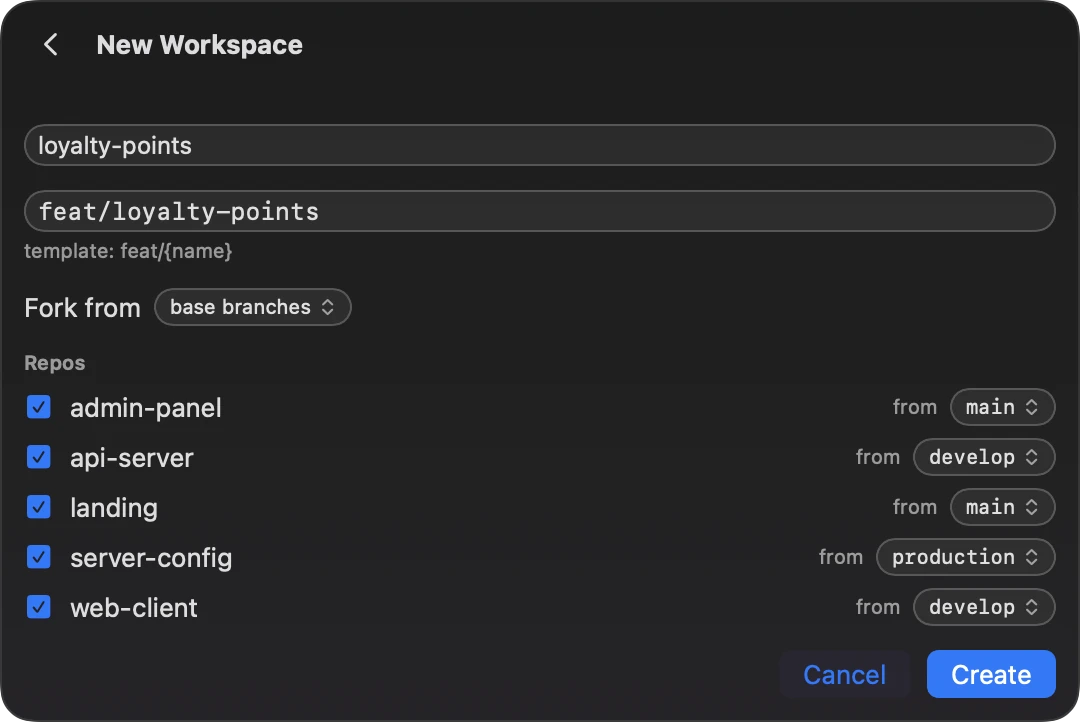
A Grove project is the folder that holds your repositories. Add it once: click the tree icon in the menu bar, open Settings, press Add project… and pick the folder. Then open the project and, on its Workspaces tab, press + Workspace:
- Type a name. The branch comes from the project’s template,
feat/{name}by default, and you can change it. - Every repository is ticked; untick the ones the feature doesn’t touch. Each starts from its own base branch, detected from
origin/HEADor set in the project’s settings, and the from menu next to it picks another. Fork from can start them from another workspace’s branches instead. - Press Create. Grove runs
git worktree addin each repository, then links or copies the project’s seed files, such asCLAUDE.md, and runs the post-create hooks you set. - Press New Claude on the workspace. The launch sheet picks the account, model and effort, and opens Claude Code in the workspace directory, in cmux or Terminal.app.
With the grove command-line tool
The CLI does the same from a terminal or a script, and installs with Homebrew:
brew install efim0v/tap/grove-cliThen create the workspace and start Claude Code in it:
grove create ~/code/acme-shop loyalty-points \
  --repos api-server,web-client
cd ~/Workspaces/acme-shop/loyalty-points
claude
grove create takes the folder that holds the repositories and a workspace name. --repos picks repositories by folder name; without it, every repository Grove finds in the folder goes in. --branch sets the branch name, and --from stacks the new workspace on another one. The CLI uses Grove’s default layout, ~/Workspaces/<project>/<name> on feat/<name>, and none of the app’s per-project settings, so it links no seed files and runs no hooks.
Doing it by hand with git
A workspace is plain git, so you can build one without Grove. In each repository, fetch, then add a worktree on the feature branch, starting from that repository’s base branch:
cd ~/code/acme-shop
ws=~/Workspaces/acme-shop/loyalty-points

git -C api-server fetch origin
git -C api-server worktree add \
  --no-track -b feat/loyalty-points \
  "$ws/api-server" origin/main

git -C web-client fetch origin
git -C web-client worktree add \
  --no-track -b feat/loyalty-points \
  "$ws/web-client" origin/main

cd "$ws"
claude
git worktree addcreates the missing directories, so there is nomkdirstep.- Put each repository’s own base branch in place of
origin/main. --no-trackkeeps git from makingorigin/mainthe new branch’s upstream, which it does by default when the start point is a remote-tracking branch. With that upstream,git statuscompares the branch withorigin/main, and a plaingit pushrefuses by default because the names differ. A branch Grove creates fromorigin/maindoes get that upstream: Grove doesn’t pass--no-track. Either way, the first push isgit push -u origin feat/loyalty-points.git fetchcomes first because nothing else here fetches: the worktree starts fromorigin/mainas your clone last saw it. Grove doesn’t fetch either; its git commands never fetch, pull or push.
What Grove adds:
- Branch names from a template,
feat/{name}by default. - A base branch per repository, detected from
origin/HEADor set by hand, or another workspace’s branches, so workspaces can be stacked. - Seed files:
CLAUDE.mdor any other file in the project folder, linked or copied to the workspace root or into each repository. - A post-create hook per repository: a shell command that runs in its new worktree.
- When a creation fails partway, the app offers to roll back what that run made: its worktrees and the branches it created.
- Each workspace’s Claude Code sessions, across accounts, shown as running, waiting or closed.
Which one to use
| Approach | Gives the session | Use it for |
|---|---|---|
--add-dir | More repositories, on whatever branch each checkout is on | One session at a time |
| A workspace | A worktree of each repository, all on the feature’s branch | Several features in parallel, each across repositories |
--worktree | A worktree of the repository you run it in, on a new branch | Parallel sessions in a single repository |
Claude Code’s own --worktree starts a session in a new worktree, by default under .claude/worktrees/<name>/ on a branch named worktree-<name>. If your product lives in one repository, that may be all you need:
claude --worktree feature-authFor the differences in detail, see Grove workspaces vs claude --worktree.
Questions
Does every repository need the same base branch?
No. Each repository starts from its own. In Grove it is detected from origin/HEAD, set per repository in the project’s settings, or picked on the New Workspace form. With the CLI, --from-branch sets it for one repository, and you can repeat it:
grove create ~/code/acme-shop loyalty-points \
  --from-branch api-server=origin/develop
Use origin/develop unless the repository has a local develop branch. Given a name that exists only on the remote, git worktree add puts the worktree on that branch and doesn’t create the feature branch.
What if the feature branch already exists?
If a repository already has a local branch of that name, Grove checks it out in the new worktree instead of creating it. Grove doesn’t look at the remote: when the branch exists only on origin, it creates a new local branch from the base branch, so create the local branch first.
By hand, leave out -b and --no-track and name the branch in place of the start point. git checks out the local branch or, if there is none, creates one that tracks the branch on origin:
cd ~/code/acme-shop
ws=~/Workspaces/acme-shop/loyalty-points
git -C api-server worktree add \
  "$ws/api-server" feat/loyalty-points
Either way, git refuses if the branch is checked out in another worktree, your usual checkout included.
How do I remove a workspace?
Remove each worktree with git worktree remove, then the directory:
cd ~/code/acme-shop
ws=~/Workspaces/acme-shop/loyalty-points

git -C api-server worktree remove "$ws/api-server"
git -C web-client worktree remove "$ws/web-client"
rmdir "$ws"
git refuses to remove a worktree with modified or untracked files unless you add --force, and rmdir stops if anything else is left, such as a seeded CLAUDE.md. The branches stay until you delete them. Grove has no button for this: a workspace is made of ordinary worktrees and branches in your repositories.
If a worktree’s directory was deleted first, git worktree prune clears what git still records about it:
git -C ~/code/acme-shop/api-server worktree pruneDoes this work with agents other than Claude Code?
A workspace is an ordinary directory, so you can start any command-line agent in it yourself. Grove itself starts, lists and moves Claude Code sessions only.
See also
- Grove workspaces vs
claude --worktree - The
groveCLI: multi-repo worktrees from a terminal or a script - Continue a Claude Code session on another account
- Brow — Claude Code usage limits in the MacBook notch
Claude Code behavior on this page was checked on 13 October 2026 against Anthropic’s documentation: the CLI reference, working directories, CLAUDE.md in additional directories, permissions.additionalDirectories and worktrees. git behavior is from the git-worktree manual and was tried with git 2.54.